
Disable Selected WordPress REST API Routes with WP Hide PRO
The WordPress REST API is an essential part of modern WordPress. It is used by WordPress core, the block editor, WooCommerce, plugins, themes, mobile applications, and external integrations.
However, plugins and themes can also register their own REST API routes. While many are required for normal functionality, others may not be needed on a particular website.
WP Hide PRO now provides a more precise way to control this exposure with Disable Selected JSON REST Routes.
Instead of disabling the entire REST API, administrators can select specific route families and remove them while keeping the rest of the API available.
Selectively Disable REST API Routes
The Disable Selected JSON REST Routes option displays the top-level REST API routes currently registered by WordPress, themes, and plugins.
Administrators can select the routes they want to disable without affecting unrelated REST API functionality.
For example, a website may use the WordPress REST API and WooCommerce, but have no need for a particular plugin’s REST API. Instead of disabling REST API functionality globally, that specific route can be removed.
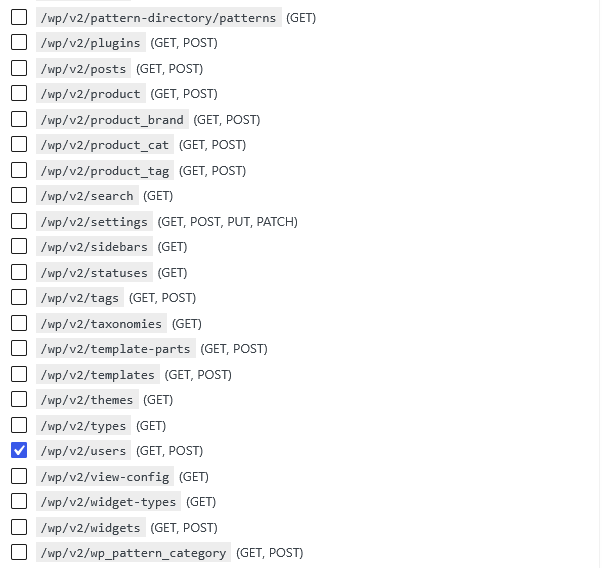
This provides much more granular control over REST API exposure.
Child Endpoints Are Disabled Automatically
REST API routes often contain multiple related endpoints.
For example, selecting:
/contact-form-7/v1/contact-forms
also disables its child endpoints, including ID-specific requests and other endpoints registered under that route, such as feedback, schema, and refill endpoints.
There is therefore no need to identify and disable every individual endpoint.
WP Hide PRO removes the selected route family from the WordPress REST endpoint map. Requests to those endpoints are consequently no longer matched by the registered REST API routes.
The result is the standard WordPress REST API “no route found” response.
Keep the REST API While Removing Unnecessary Routes
The main advantage of this feature is that you do not have to choose between exposing the entire REST API and disabling it completely.
You can keep the REST routes required by:
- WordPress and the block editor
- WooCommerce
- Themes and plugins
- Mobile applications
- External integrations
while removing specific plugin or theme routes that are not required.
This can reduce unnecessary REST API exposure without interfering with functionality that depends on the API.
Test Before Disabling a Route
REST API routes can be used by functionality that is not immediately obvious. A route may be required by a frontend form, administration interface, mobile application, or external service.
For this reason, test the website carefully after disabling a route. Check both the frontend and administration area, along with any integrations that communicate with the website.
If a feature stops working, the disabled route may be required by that functionality and should be enabled again.
Final Thoughts
Disable Selected JSON REST Routes gives WP Hide PRO users more precise control over the WordPress REST API.
Rather than disabling REST API functionality globally, administrators can remove specific route families while keeping the rest of the API available.
This makes it possible to reduce unnecessary API exposure while preserving the REST functionality required by WordPress, WooCommerce, the block editor, plugins, themes, and external integrations.
As always, selectively disable only the routes that are not required by your website and test carefully after making changes.


Recent Comments