
Vulnerability Scan with AI: Know Your Plugins/Themes Risk Before It Becomes a Problem
WordPress sites depend on plugins to add functionality, but every additional plugin also expands the attack surface. Even well-maintained plugins can become risky when a new vulnerability is disclosed, especially if a site is still running an older version. That is exactly the problem the new Vulnerability Scan feature in WP Hide PRO is designed to solve.
Built on proprietary AI-engineered insights, trained with advanced models and enriched by CVE records and other trusted vulnerability sources, Vulnerability Scan gives site owners a fast, practical way to understand whether installed plugins are exposed to known security issues. Instead of relying on guesswork, manual research, or delayed discovery after an incident, the scan checks the actual plugin versions deployed on a WordPress instance against a comprehensive vulnerability database and returns clear, actionable results.
Table of Contents
A smarter way to assess plugin risk
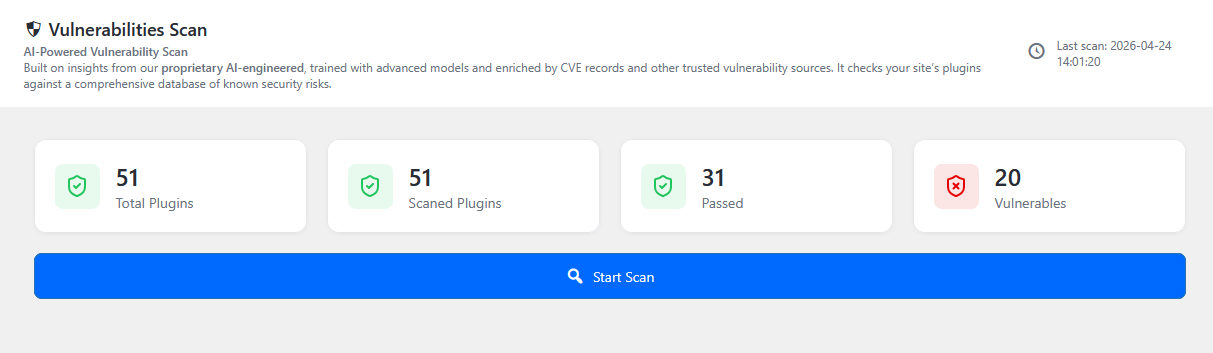
The core idea behind Vulnerability Scan is simple: compare what is installed on the site with what is known to be vulnerable. The feature reads the current plugin inventory, identifies the installed version of each plugin, and evaluates it against the vulnerability knowledge base. When a match is found, the system flags the plugin and returns clear, actionable information about the issue.
What makes this especially valuable is that the scan does not look only at the current version. It also informs users about the historical vulnerability record for a specific plugin or theme, giving users a broader view of its security track record over time. This helps site owners understand whether a component has consistently maintained a strong security posture or whether it has been repeatedly associated with known issues. In other words, it adds context: not just whether a plugin is vulnerable today, but how trustworthy its codebase has been in the past and how likely it may be to remain stable in the future.
That makes Vulnerability Scan more than a simple detection tool. It becomes a decision-support feature that helps administrators judge risk with greater confidence before updating, keeping, or replacing a plugin.
How the workflow works
The workflow is intentionally straightforward.
First, the scan inspects the WordPress environment and reads the installed plugins and their versions. Then it compares those versions against the vulnerability knowledge base. When a match is found, the scan generates a report for that plugin. The report can include the vulnerability type, the affected component, the highest safe version, severity, score, publication date, update date, and a reference to the relevant CVE record.
If the installed version is outside the affected range, the plugin is marked as passed. If it is vulnerable, the scan highlights the risk and surfaces the relevant details so the administrator can act quickly. This makes the feature suitable both for routine checks and for investigating newly disclosed threats.
What the report reveals
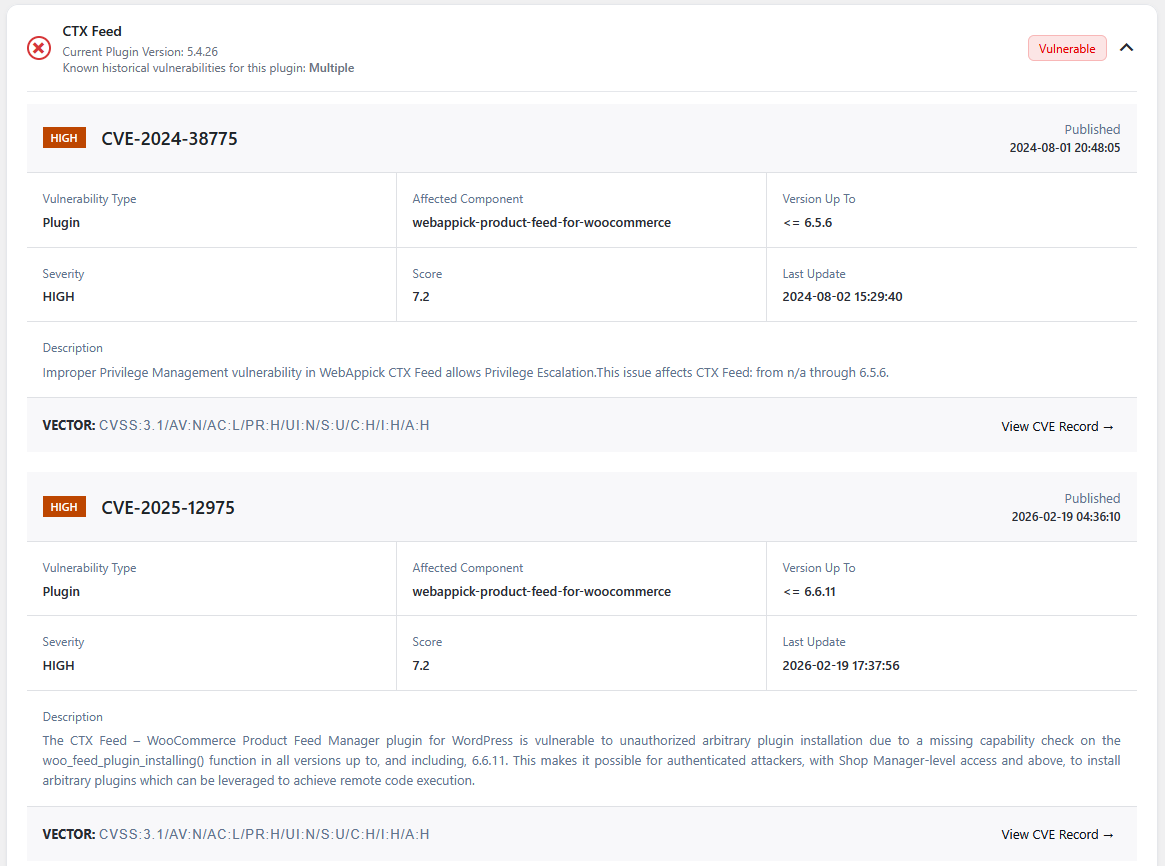
The sample report illustrates the level of detail users can expect. A vulnerable plugin is not simply labeled “at risk.” Instead, the scan presents a structured summary that helps users interpret the issue at a glance. It can show:
- the specific plugin name and current version
- the vulnerability identifier
- the affected component
- the version range known to be vulnerable
- the severity and score
- the publication and update timestamps
- a direct path to the CVE record.
That level of detail matters because it helps administrators prioritize. Not every vulnerability carries the same risk, and not every fix has the same urgency. A site owner can immediately see whether an issue is informational, moderate, high, or critical, and decide what needs to be patched first.
Why this feature matters
For agencies, developers, and site owners, vulnerability awareness is one of the most important parts of routine maintenance. Plugin updates are often delayed for practical reasons: compatibility testing, client approval, or simple oversight. Vulnerability Scan helps close that gap by showing exactly where exposure exists.
The benefit is not only speed, but clarity. Instead of combing through plugin changelogs, CVE databases, and security advisories by hand, users get a consolidated view inside WP Hide PRO. That saves time, reduces manual error, and makes security checks repeatable.
It also supports better decision-making. When a vulnerability is tied to an installed plugin, teams can immediately determine whether they need to update, replace, disable, or monitor that component. The result is a more proactive security posture and a smaller window of exposure.
Engineered for Ongoing Security Protection
A good security workflow is not only about reacting to incidents. It is about staying ahead of them. Vulnerability Scan supports that mindset by turning plugin review into an ongoing practice rather than a one-time audit. Because WordPress environments change frequently, an installed plugin that was safe yesterday may become a concern tomorrow after a new advisory is published. Regular scanning helps keep that risk visible.
This is especially useful for sites with many plugins or multiple managed installations. As the plugin count grows, so does the complexity of tracking security status manually. A built-in vulnerability scan brings that information into one place and gives teams a reliable baseline for security operations.
Designed to be practical
The strength of Vulnerability Scan is that it combines depth with simplicity. It does not overwhelm users with raw data. It presents the most relevant facts in a format that is easy to understand and easy to act on. Passed plugins remain clearly identified, while vulnerable ones are surfaced with enough detail to support remediation.
For WP Hide PRO users, that means stronger visibility, faster response times, and less uncertainty around plugin safety. In a platform where plugin ecosystems change constantly, that kind of visibility is invaluable.
Vulnerability Scan turns plugin security from a reactive chore into a structured, intelligence-driven workflow. It helps teams see the risk, understand the impact, and move faster with confidence.


Recent Comments